The Imixs Microkernel Architecture
A BPMN model describes the flow of a process with tasks, events and gateways. A task describes a state, while an event describes the transition from one state to the next. But an event is also responsible for executing business logic, for example validate data with business rules in the Rule Plugin, send an email with the Mail Plugin or set the access rights for a process instance. The Imixs microkernel architecture lets you extend this logic with your own code, without changing the engine itself and without moving the process logic out of the model.
The Idea
Imixs-Workflow consists of two layers.
The WorkflowKernel is a plain Java class (POJO) that does not depend on any framework. It knows how to process a BPMN event and how to move a process instance from one task to the next, and it makes sure that the process instance follows the workflow described in the model. The same kernel can run in different environments, for example in an engine on Jakarta EE or on Quarkus.
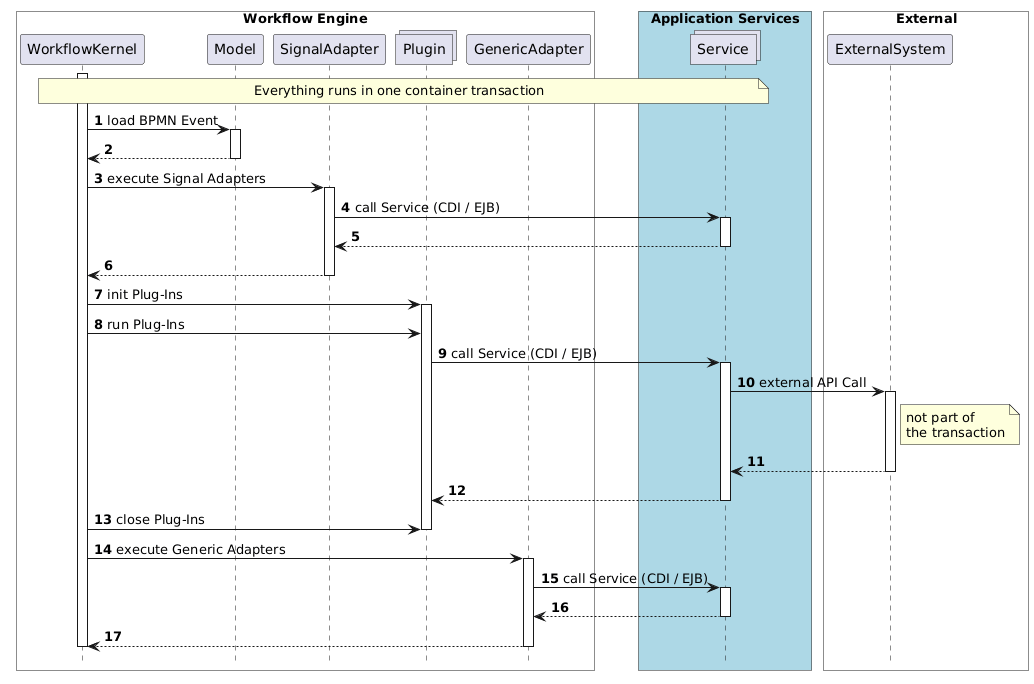
The Workflow Engine wraps the kernel and adds the runtime environment. On Jakarta EE this is the WorkflowService. It calls the kernel to compute the new state of a process instance and runs the plugins and adapters that are bound to an event, all within one container transaction. This is done with CDI, so your extensions are managed by the application server and can use all of its services.
This gives you a clear separation:
- The BPMN model defines the process flow and decides which extensions are used.
- The WorkflowKernel computes the state of the process instance and ensures that it follows the model.
- The Workflow Engine provides the environment: the transaction, CDI and the execution of the extensions.
- The extensions (plugins and adapters) contain your business logic.
Two Extension Points
Imixs-Workflow offers two ways to extend the processing of an event:
| Plugin | Adapter | |
|---|---|---|
| Bound in the model | to the Workflow section | to a single event by a BPMN signal definition |
| Executed | during the processing life-cycle of every event | only on an event bound to this adapter |
| Interface | Plugin with init(), run() and close() |
SignalAdapter with execute() |
| Typical use | business rules, validation, enriching data | calling another system as a defined step of the process |
Both receive the process instance and the event that is currently processed. Both can change the data of the process instance. Both can also stop the processing and roll back the transaction.
Details can be found in the Plugin API and the Adapter API.
Imixs Workflow on Jakarta EE
On Jakarta EE, the Workflow Engine runs your plugins and adapters as managed components within the application server. This means that an extension can use everything the application server provides: CDI beans, EJBs, JPA and all other services of your application.
The services are injected by the application server. See the following example:
public class DemoPlugin extends AbstractPlugin {

    // inject services...
    @Inject
    ModelService modelService;

    public ItemCollection run(ItemCollection documentContext, ItemCollection adocumentActivity)
            throws PluginException {

        // use the injected service
        List<String> versions = modelService.getVersions();
        ...
    }
}
A SignalAdapter works the same way, but it is bound to one specific event, whereas a Plugin runs on every event of the model.
All your extensions can use your own services, for example to read data from your application or to call another system. There is no need to build a separate integration layer next to the engine.
Plugins Included in the Engine
The Imixs-Workflow engine is built on this mechanism itself. It already provides a set of ready-to-use plugins that you activate in your model, for example:
- Mail Plugin sends email notifications
- History Plugin generates a human-readable processing history
- Rule Plugin computes business rules
- Split & Join Plugin supports splitting and joining process instances
- Approver Plugin manages an approval process
See Standard Plugins for the complete list.
Transactions
The WorkflowService is an EJB, so processing an event runs in a container-managed transaction. By default, the method joins the transaction of the caller or starts a new one. Everything happens inside this transaction: loading the process instance, running the plugins and adapters, and saving the result. The engine saves the process instance at the end, after all plugins and adapters have been executed.
If a Plugin throws a PluginException, the engine marks the transaction for rollback and passes the exception on to the caller. Nothing is saved, and the work of all transactional resources is rolled back with it, for example database changes made through JPA.
There is one limit you should know. An external system that you call over HTTP does not take part in the transaction. If a later Plugin fails, the call to this system has already happened. For this case, the method close() of a Plugin tells you if the transaction is rolled back, so that you can undo or compensate work that the container cannot roll back.
To process several process instances independently, for example in a batch job, use the method processWorkItemByNewTransaction. It runs each process instance in its own transaction, so a failure rolls back only that one.
What's Next…
- Try it yourself: Part 2 of the tutorial shows how to build and run your first Plugin.
- Learn the interfaces: The Plugin API and the Adapter API describe the life-cycle and the options in detail.
- See the standard plugins: The Standard Plugins of the engine are good examples for your own extensions.
- Understand the foundation: The Core API describes the concepts behind the kernel.
Documentation
Core Concepts
Building Applications
Operations
Project
Community
