The Imixs-BPMN Task Element
When a Imixs BPMN Task Element is selected in the Drawing Canvas, different settings can be configured from the tabbed property sheets displayed in the Property panel.

The property settings are grouped into different sections.
General Properties
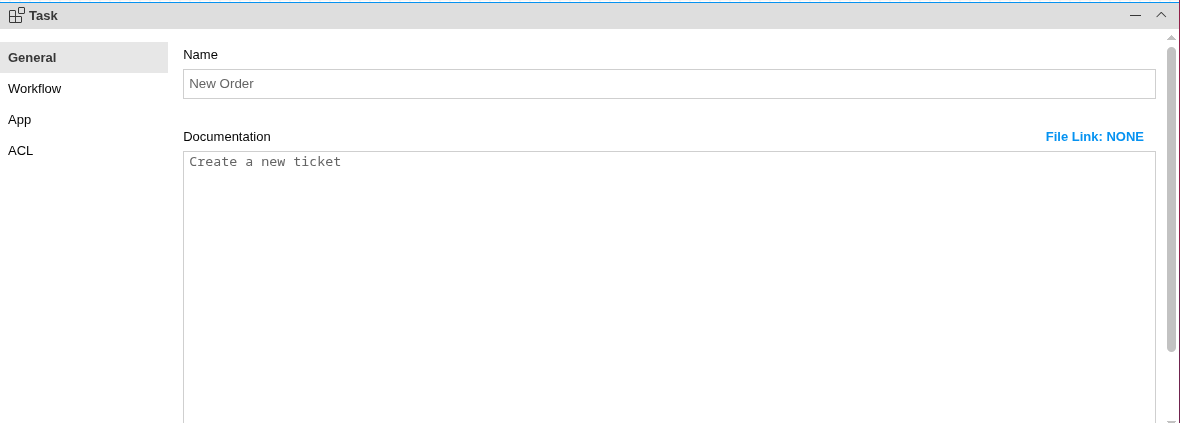
The property tab ‘General’ of a ‘Task’ element defines basic BPMN attributes.
| Property | BPMN Attribute | Type | Description |
|---|---|---|---|
| name | name | String | name of the task element |
| documentation | bpmn2:documentation | String | short description |
The name of the Task element is used as an human readable status identifier. It describes the status of a process instance within the process model (e.g. “New Open”, “In Approval”, “Completed”,…).
The documentation can provide information how the task should be performed or which information need to be entered into a application.
Workflow

The Tab ‘Workflow’ provides identifiers and additional properties used by the Imixs Workflow System to uniquly identify a task by its ID within the current workflow and to provide the user with additional information about the task. The documentation can also be created by assigning a TextAnnotation element to the task. In this case the documentation field of the Task should remain empty.
| Property | BPMN Attribute | Type | Description |
|---|---|---|---|
| Process ID | imixs:processid | Integer | unique task identifier within the model |
| Type | application.type | String | type definition to be assigned to a process instance |
| Symbol | application.icon | String | Status icon to be assigned to a process instance |
| Summary | workflow.summary | String | The definition of a workflow summary |
| Abstract | workflow.abstract | String | The definition of a workflow abstract |
Process ID
Every Imixs Task Element has an unambiguously identifier called the TaskID. The TaskID is assigned to a running process instance to identify the status of a WorkItem controlled by the Imixs Workflow Engine.
Note: The task ID of each Task Element must be unique within one model.
WorkItem Type
The ‘WorkItem Type’ is a category assigned to the WorkItem by the Workflow Engine when the WorkItem was processed.
Symbol - Status Icon
A ‘Status Icon’ can be a Image URL to visualize the current status of a WorkItem.
Workflow Summary
The Workflow Summary is used to describe the status of a WorkItem. This can be a static or dynamic text message. The following example generates a dynamic Workflow Summary from the WorkItem property ‘ticket.number’.
Open Ticket: <itemValue>ticket.number<itemValue>
Workflow Abstract
The Workflow Abstract defines the long description of a WorkItem. The Abstract is similar to the Workflow Summary and can also be dynamically computed from WorkItem properties. The following example shows how the abstract can be computed from WorkItem properties using the HTML markup language:
 Ticket opened by <itemValue>$creator<itemValue>
 <br />
 Ticket No.: <itemValue>ticket.number</itemValue>
 <hr />
See the Text Replacement feature how to insert WorkItem Values into a message text.
Application Properties

The Property Tab ‘Application’ defines information used to control the behavior of a WorkItem in the workflow application.
| Property | Type | Description |
|---|---|---|
| application.editor | String | Form editor id to be assigned to a process instance |
| application.form | String | A form description (xml) |
Input Form
The ‘Input Form’ can be used to control how a WorkItem in a specific status is displayed or how it can be edited inside the workflow application. This allows the model to control the behavior of the application in a specific way.
ACL Properties
The ACL defines the read-, write- and ownership, an actor will be granted for, after processing a WorkItem.
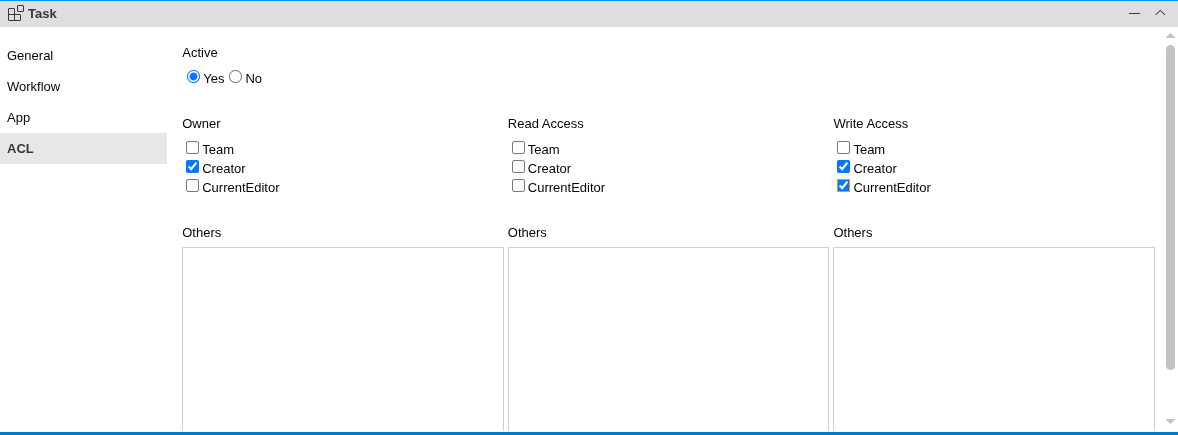
Actors play an essential role within a human-centric workflow system. In Imixs-Workflow the actors can be defined statically by adding user- or group IDs, or the ACL can be dynamically computed based on the properties of a process instance. The dynamic mapping of actors to a workitem property is defined by the process properties of the workflow model.
Note: If the ACL setting is defined on Event level, the ACL settings on the Task Level will be overwritten.
Owner, Read and Write Access:
The ACL of a WorkItem is defined in three different layers.
-
The ‘Owner’ describes the users assigned to the process instance. This setting defines the users task list.
-
The ‘Read Access’ restricts the general access to a process instance. Only users which are assigned to the Read Access can access the process instance. If no read access is defined at all, the process instance is not read restricted.
-
The ‘Write Access’ restricts the write access to a process instance. The Write Access depends on the AccessLevel a user is granted for. If a user is assigned to the role org.imixs.ACCESSLEVEL.AUTHORACCESS and is not listed in the Write Access List, the user is not allowed to update the process instance. Find more details in the security section.
The ACL can be defined either in a static or by a mapping between the properties of the process instance to the ACL definition.
The Static ACL List:
User- or Group IDs added to the ACL have to match the login name and role definitions of the workflow application. Imixs-Workflow defines the following functional roles which can be added to a static ACL definition:
- org.imixs.ACCESSLEVEL.READACCESS
- org.imixs.ACCESSLEVEL.AUTHORACCESS
- org.imixs.ACCESSLEVEL.EDITORACCESS
- org.imixs.ACCESSLEVEL.MANAGERACCESS
The ACL Mapping:
The ACL Mapping is used to map a property of the process instance to the ACL. The mapping list can be defined by the Process Property Editor.
See also the section security settings for more details about access control of Imixs-Worklow.
| Property | Type | Description |
|---|---|---|
| acl.update | boolean | indicates an ACL update on the task level |
| acl.owner_list | String List | a static owner list |
| acl.owner_list_mapping | String List | defines the mapping of a workitem property to the owner list |
| acl.readaccess_list | String List | the a static read access list |
| acl.readaccess_list_mapping | String List | defines the mapping of a workitem property to the read access list |
| acl.writeaccess_list | String List | the a static write access list |
| acl.writeaccess_list_mapping | String List | defines the mapping of a workitem property to the write access list |
